Native CSS Nesting: When It Replaces Sass, When It Doesn't
Native nesting closed most of the gap that made preprocessors mandatory. Most — not all. A practical guide to what's good, what's still missing, when to drop Sass or Less, when to keep them, and how to keep your stylesheets honest with Stylelint.
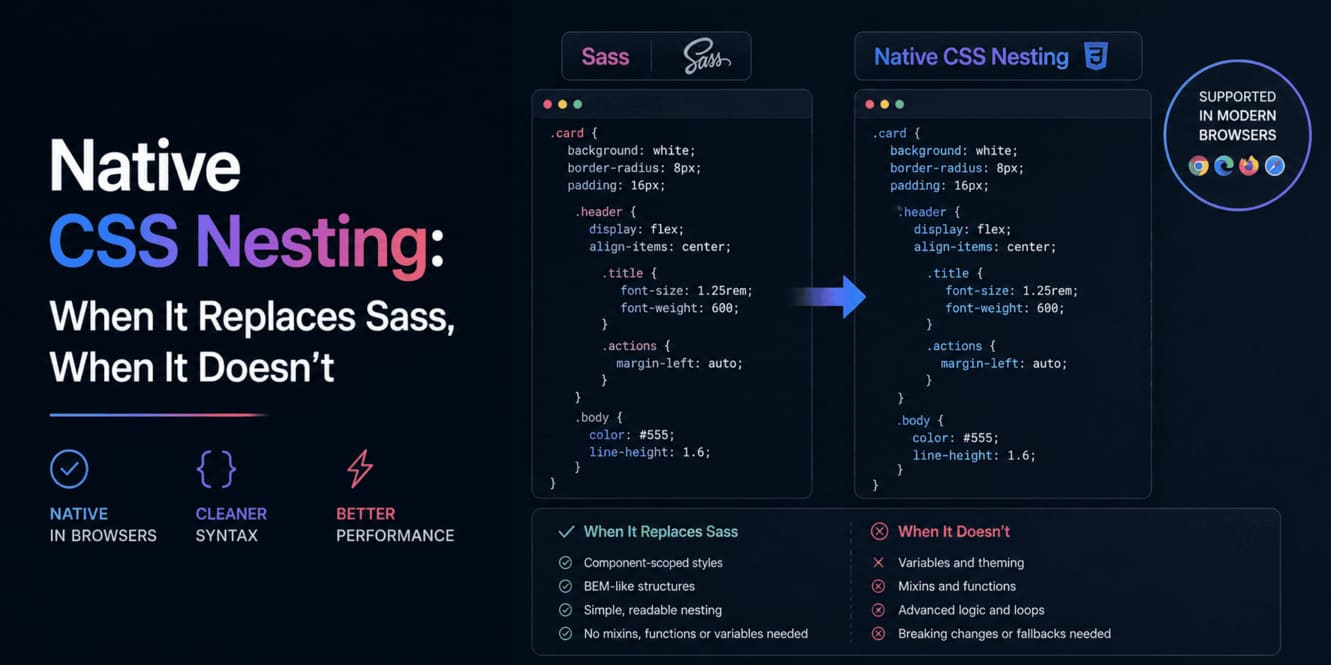
For about fifteen years, the answer to “what should we use to write CSS?” was the same in every senior interview: a preprocessor. Sass, Less, Stylus — pick your flavor. Plain CSS was for tutorials.
Today the honest answer is different. Native CSS — the version your browser parses without a build step — has quietly absorbed most of the features that made preprocessors mandatory. Nesting. Layers. Custom properties. Modern color functions. The argument for Sass is no longer “you’d be insane not to”. For most projects in 2026 it’s the opposite: you’d be paying a real cost — toolchain, build time, runtime — for features the browser already gives you for free.
But “most” isn’t “all”. This article walks through what native nesting actually buys you, what it still doesn’t, when dropping Sass is the right call, when keeping it is, and how to keep the result clean with Stylelint.
Native nesting in one example
If you’ve never seen it, here’s the entire feature in one block:
.card {  padding: var(--space-4);  border: 1px solid var(--color-border);  border-radius: var(--radius-md);
  .card__title {    font-family: var(--font-family-display);    font-size: var(--font-size-lg);  }
  &.card--featured {    border-color: var(--color-accent-primary);  }
  &:hover {    transform: translateY(-2px);  }
  @media (min-width: 720px) {    padding: var(--space-6);  }}
That’s not Sass. That’s plain Card.css, served straight to Chrome, Firefox, and Safari. No build step. No PostCSS plugin. No @use at the top. The browser parses it directly and computes the same selectors a preprocessor would have produced — .card .card__title, .card.card--featured, .card:hover, and the media-query variant.
If your last memory of plain CSS is from before 2023, that single feature is worth revisiting your assumptions over.
The good parts
1. The mental model finally matches BEM
The pattern the team has used for years — block, element, modifier, all visually grouped — was always a file organization convention. Sass made it look like the language understood it. Native nesting actually delivers on that promise without a translator in the middle.
Every BEM block becomes its own braces. Elements live inside it. Modifiers, pseudo-states, and breakpoints sit at the bottom of their parent. Reading a stylesheet top-to-bottom now mirrors the way you reason about the component.
2. The cascade got tools, not just hacks
The pieces that actually replace Sass are not just nesting. They are a small family of features that work together:
@layer— declarative cascade order.@layer reset, tokens, base, components, utilities;decides who wins before any selector is written. Specificity wars stop being a thing inside a layered codebase.- Custom properties — runtime variables. Themeable, dark-mode-able, JS-readable, debug-able in DevTools without a sourcemap. Sass
$variablescannot do any of those. color-mix()and modern color spaces — the use case that keptdarken()/lighten()alive in Sass is nowcolor-mix(in oklch, var(--color-accent), black 20%). In the browser. At runtime.- Container queries — components query their container’s size, not the viewport. Sass never had an equivalent because Sass runs at build time and doesn’t know what containers exist.
:has(),:is(),:where()— selector primitives that remove a huge class of “I need to generate this with a loop” complaints.
Each one of these closes a different gap. Together they cover, in my experience, maybe 95% of what kept us reaching for a preprocessor.
3. The toolchain gets simpler
This is the underrated win. Drop Sass and you drop:
- A dev dependency (
sassordart-sass) that needs upgrading every year. - A compile step in dev and prod.
- A whole class of “works in Sass but not in browsers” footguns (legacy
/,@importof partials, vendored math). - A second mental model your juniors have to learn before being productive.
What you keep:
- One file per component.
- Stylelint as your only CSS-side dependency.
- A
<style>block in your.astrocomponent that ships exactly what’s there, scoped by the framework.
I’ve migrated two real codebases off Sass in the past 18 months. In both, the diff was net-negative lines and the package.json got smaller. That’s the rare refactor that makes everything cheaper.
The not-so-good parts (be honest)
If anyone tells you native nesting is a drop-in replacement for Sass, they haven’t shipped a large stylesheet. There are real gaps. Knowing them is the difference between making an informed switch and discovering them mid-migration.
1. There are no mixins
Sass @mixin / @include is the feature people miss most. CSS has nothing equivalent. There is no way to say “here’s a reusable block of declarations, paste it with these arguments”.
The honest workarounds:
- Custom properties + utility classes: most “mixins” were just bundles of declarations. Move them to a single class (
.surface-elevated,.text-truncate) and apply by composition. @layer utilities: gives you a namespace where utility classes can never lose to component selectors, removing the main reason mixins were used as escape hatches.color-mix()+ variables: replaces 80% of color-manipulation mixins.
What still hurts: anything that genuinely takes parameters and produces different selectors. There is no native answer to a Sass mixin that loops over breakpoints to produce sm:, md:, lg: variants of a class. If your design system was built on that pattern, you’re not going to delete Sass with a script.
2. There are no functions
Sass functions like lighten($color, 10%), darken(), transparentize(), mix() are gone. Most are replaceable with color-mix(in oklch, ...) and the new color spaces — and the new approach is actually better (perceptually uniform, supports wide gamut). But “replaceable” is not “automatically migrated”.
Math functions are mostly fine: calc(), min(), max(), clamp() cover almost everything. There’s no @function, but you rarely need to define one once you have variables and calc.
3. The & selector has subtle rules
Two gotchas worth knowing before they bite you:
- Type selectors immediately after
&are reserved:& divworks (descendant), but&divdoes not “concatenate” the way Sass does. Sass let you write&__titleand produce.card__title. Native nesting cannot do that. You write the full child selector inside the block:.card__title { ... }. - Specificity is
:is()-equivalent: a nested rule’s specificity is calculated as if its compound selector were wrapped in:is(). Most of the time that matches your intuition. Once in a while it doesn’t —&:hoverinside a heavily-modified block lands at a different specificity than the same selector flat. When in doubt, check DevTools.
If your team is migrating from Sass, these two rules are the only ones I’d put on a sticky note.
4. Old Safari and tooling lag
Native nesting has been stable since Safari 16.5 (May 2023). If your support matrix includes anything older than that, you need a polyfill or a compile step — at which point you might as well keep Sass.
The other lag is editor / linter integrations. Most Stylelint rules support nesting now, but a handful of plugins are still catching up. We’ll come back to this in the practices section.
5. There are still no partials in the Sass sense
@import exists in CSS but is widely discouraged because it blocks parallel loading. The modern answer is to bundle CSS at the framework level (Astro, Vite, Next) or use a CSS bundler. Sass @use / @forward was nicer, but it solved a problem the bundler now solves better.
When to keep Sass (or Less)
This is the part of the article most people skip. Native nesting being good for most projects is not the same as it being right for yours. A short, honest list of when I would keep a preprocessor:
- You ship to browsers older than Safari 16.5. Enterprise and government projects sometimes still do. You need a compile step. Use Sass.
- Your design system relies heavily on generated utility classes. If your codebase has hundreds of
@mixin breakpoint($name)and@each $size in $sizesloops, the migration cost is real. Keep Sass until that pattern is replaced by a different approach (utility framework, design-token pipeline, code generation). - You already use Sass and the team is happy. “Native is enough” is not a reason to spend a quarter migrating a working codebase. Migrate when you have another reason — a build-time pain point, a hire who’d be confused by your stack, an upcoming refactor that touches the styles anyway.
- You need true selector composition.
@extendhas no native answer. If you depend on it heavily, native nesting is a downgrade.
What about Less? Honestly: in a new project, never. Less stopped evolving meaningfully years ago, and any reason to use it is now better served by either native CSS or Sass. The only valid Less story today is “we’re maintaining a legacy codebase and migrating off costs more than keeping it”.
When to drop Sass — and how
Most product codebases I look at today should drop Sass. The migration is rarely a single PR; it’s a pattern.
A staged plan that has worked for me:
- Stop adding new Sass. New components ship as
.csswith native nesting. Stylelint enforces this. - Define the cascade explicitly. Pick your
@layerorder on day one (reset, tokens, base, components, utilities). Every existing Sass file lands incomponentswhen migrated. - Replace mixins with classes or custom properties. Audit your
@mixinlist. For each one, decide: can this be a utility class? can this be a--variable? does this one really need a loop? - Replace color functions with
color-mix(). This is the biggest single substitution. Once tokens move to OKLCH or P3, the visual result is also better. - Migrate file by file. Don’t try to keep Sass and CSS coexisting in the same component. Pick a leaf component, convert it, lock it with Stylelint, move to the next.
- Delete the dependency last. When the last
.scssfile is gone, dropsassfrompackage.jsonand remove the build step. Thegit diffof that PR is the satisfying one.
Good practices once you’re using native nesting
The fact that native nesting is easier to reach for makes it easier to abuse. A few rules I enforce on every project that uses it:
1. Cap nesting depth at 2 — 3 at the absolute most
Deep nesting was bad in Sass and it’s still bad in native CSS. Specificity climbs, readability falls, and the resulting selectors get fragile. The Card.css example at the top of this article is at the right depth: block → element / modifier / state. If you’re nesting four deep, your component is doing too much, or your DOM is too deep, or both.
2. Use BEM names; reserve & for state and modifiers
Even with nesting, write the element class explicitly:
.card {  .card__title { ... }     /* good — readable, greppable */
  & .card__title { ... }   /* unnecessary, slightly different specificity */
  &__title { ... }         /* doesn't work — type selector after & is reserved */}
Reserve & for what it’s really good at: pseudo-states (&:hover, &:focus-visible), modifiers (&.card--featured), and parent-context selectors (@media, :has()). That convention keeps grep-ability intact: searching for card__title lands on every place it’s defined, instead of disappearing into a Sass concatenation that didn’t survive.
3. Layer your CSS up front
Decide and write the layer declaration on day one of the project:
@layer reset, tokens, base, components, utilities;
@import url('./reset.css') layer(reset);@import url('./tokens.css') layer(tokens);@import url('./base.css')   layer(base);
Component CSS goes into components (Astro / Vite handles this if you tell it to). Utility classes go into utilities. Now a utility never has to win a specificity war — its layer wins by definition.
4. Tokens go in :root, not in Sass variables
There is no reason to keep design tokens in $variables once native nesting works. Move them to CSS custom properties:
:root { --color-accent-primary: #3bc7ff; --space-4: 1rem; --radius-md: 0.5rem;}You get runtime themability, DevTools introspection, JS read access, and dark mode for free. Sass variables give you exactly none of those.
5. Lint with Stylelint — and pick the right rules
Stylelint is the one piece of tooling that survives the Sass-to-native migration intact. Recommended baseline:
{ "extends": [ "stylelint-config-standard", "stylelint-config-recess-order" ], "rules": { "max-nesting-depth": 3, "selector-max-compound-selectors": 4, "no-descending-specificity": null, "selector-class-pattern": "^[a-z][a-z0-9]*(?:__[a-z0-9]+)?(?:--[a-z0-9-]+)?$", "declaration-block-no-redundant-longhand-properties": null }}What each rule earns its keep for:
max-nesting-depth: 3— the rule that prevents the only real abuse of native nesting.selector-class-pattern— enforces BEM naming. A team without this rule will eventually break BEM by accident.stylelint-config-recess-order— sorts declarations consistently (positioning → box model → typography → visual). Removes a whole category of nitpicky review comments.- Disable
no-descending-specificity— it fights legitimate&:hoverpatterns and produces noisy warnings inside nested blocks. Disable it; rely on layers and depth caps instead.
Run Stylelint in pre-commit and CI. The cost is seconds, the payoff is consistency over the lifetime of the codebase.
6. Keep media queries inside the block they belong to
One of native nesting’s biggest wins is that @media lives where the rule it modifies lives:
.card {  padding: var(--space-4);
  @media (min-width: 720px) {    padding: var(--space-6);  }}
Resist the urge to move all your media queries to a global responsive.css. The whole reason nesting helps is that the responsive variant is right next to the rule it overrides. That’s the same principle as keeping a test next to the file it tests.
7. Don’t mix Sass and native nesting in the same file
If you’re mid-migration and a component still has a .scss file, leave it alone until you migrate it whole. Mixing &__title (Sass concat) and .card__title (native) in the same file produces output nobody can predict at a glance. Migrate atomically; don’t half-do it.
A short field guide of smells
- “My nested selector exploded into something I didn’t expect.” You’re using
&followed by a type selector or trying to concatenate names. Write the child class explicitly. - “My utility class is losing to a component selector.” You forgot to layer. Put utilities in
@layer utilitiesand the problem disappears. - “My nesting is six levels deep.” You’re not abusing nesting; you’re abusing your DOM. Flatten the component first.
- “I miss
darken().”color-mix(in oklch, var(--color-x), black 15%)is the answer, and it’s perceptually better thandarken(). - “I miss
@mixin.” 80% of mixins were really utility classes. The other 20% are either custom properties or a sign that the component should be split.
The bottom line
Native CSS in 2026 is good enough that “Sass by default” is no longer the senior-engineer answer. The good answer is: use the platform, drop the toolchain that was once load-bearing, and reach for Sass deliberately when one of a small list of real reasons applies. Then lint what you have so the freedom doesn’t turn into a mess.
Sass and Less were the bridges that made CSS bearable for a decade. The bridges weren’t wrong — they were necessary. But the river underneath them has narrowed. Most teams can walk across now without paying the toll. Just be honest about which river you’re crossing before you take the bridge down.